
Cyclones are the bane of my existence in lifting coordination. Not because they mess up my perfectly optimised schedule; no, rather they are often so very unpredictable.
Severe Tropical Cyclone Zelia in February 2025 was not too erratic compared to some, but continued differences in three-hourly cyclone tracks from the Bureau of Meteorology made it difficult to plan the potential impacts of Zelia’s associated wind, wave and swell on the Port of Ashburton (from where Wheatstone LNG cargoes sail).
To demonstrate this variability to the Wheatstone JVPs in our weekly update meeting with their Lifters, I wanted to merge around four dozen cyclone track PDF files into one animated GIF. I felt that being able to show the constantly changing tracks after the fact would drive home the point that their flexibility in cargo planning and in last-minute schedule adjustments is what helps the Wheatstone asset so often avoid lost production opportunities from cyclones.
However, piecing together several dozen images from PDFs is definitely not something I would attempt without some kind of automation, as the time spent completing the task manually would far outweigh the informative payoff for the Lifters. Gone are the days of kludging together Python code from Google searches and GitHub burrowings; nowadays, a few minutes prompting Copilot or ChatGPT is all that’s needed to parlay even a basic understanding of coding into an actionable Production output:
“Using Python, explain how I can take a collection of several dozen PDFs, extract just the first page from each of these PDFs, and then convert this group of first pages into an animated GIF.”
This was the initial prompt that set the stage for a surprisingly quick output of the desired GIF. My goal was clear: to leverage Python for extracting the first page from several dozen BoM cyclone update PDFs, and then converting these pages into an animated GIF.
The first step involved extracting the first page from each PDF file. Copilot suggested using the PyMuPDF library to iteratively loop through each PDF in the specified directory, load the first page, and save the page from the PDF as an image file.
import fitz  # PyMuPDF
from PIL import Image
import imageio
import os

# Directory containing PDFs
pdf_dir = r'C:\pdfs'
# Directory to save extracted images
img_dir = r'C:\images'

# Ensure the image directory exists
os.makedirs(img_dir, exist_ok=True)

# List to hold image file paths
image_files = []

# Check if the PDF directory exists
if not os.path.exists(pdf_dir):
    print(f"Directory {pdf_dir} does not exist.")
else:
    # Extract first page from each PDF
    for pdf_file in os.listdir(pdf_dir):
        if pdf_file.endswith('.pdf'):
            pdf_path = os.path.join(pdf_dir, pdf_file)
            doc = fitz.open(pdf_path)
            page = doc.load_page(0)  # Load first page
            pix = page.get_pixmap()
            img_path = os.path.join(img_dir, f"{os.path.splitext(pdf_file)[0]}.png")
            pix.save(img_path)
            image_files.append(img_path)
With the images saved, the next task was to create an animated GIF from them. Copilot initially suggested the imageio library to create the GIF, specifying the duration for each frame. However after a few executions of the code, I realised I needed to ensure the GIF looped indefinitely and that each frame lasted longer; Copilot helped me adjust the code to use Pillow for more control over the frame duration:
# Create an animated GIF using Pillow
images = [Image.open(img) for img in image_files]
gif_path = 'output.gif'

# Duplicate the first and last images for longer pause
images.insert(0, images[0])
images.append(images[-1])

# Set durations: longer for first and last images
durations = [2000] + [1000] * (len(images) - 2) + [2000]  # 2000ms for first and last, 1000ms for others

images[0].save(
    gif_path,
    save_all=True,
    append_images=images[1:],
    duration=durations,
    loop=0
)

print(f"Animated GIF saved as {gif_path}")
During the process, I encountered a few errors, like the good old FileNotFoundError, and `unicodeescape` error. These were resolved with a simple prompt to Copilot to explain the error (mostly problems at my end like not verifying the directory paths and using raw strings for file paths). Additionally, I ensured the durations for each frame were set to what I felt looked good, including by increasing the duration of the first and last images in the GIF to give the viewer a sense of “before” and “after”. The GIF was nearly there – but it was still an animation of the entire PDF page!

So finally, to crop the GIF to just the map showing the cyclone track, I prompted Copilot (“how can I trim the gif to just a portion of the area of the image?”) to lead me to using the Pillow library again to iterate through each frame and crop it. This involved defining the crop area (by inspecting the coordinates of the map boundaries in our old faithful friend, MS Paint), and applying the crop to each frame:
from PIL import Image, ImageSequence

# Path to the original GIF
gif_path = r'C:\pdfs\output.gif'
# Path to save the cropped GIF
cropped_gif_path = r'C:\pdfs\cropped_output.gif'

# Open the original GIF
original_gif = Image.open(gif_path)

# Define the crop area (left, upper, right, lower)
crop_area = (50, 50, 300, 300)  # Adjust these values as needed

# List to hold cropped frames and their durations
cropped_frames = []
durations = []

# Iterate through each frame in the original GIF
for i, frame in enumerate(ImageSequence.Iterator(original_gif)):
    # Crop the frame
    cropped_frame = frame.crop(crop_area)
    cropped_frames.append(cropped_frame)

    # Set duration: 2000ms for first and last frames, 1000ms for others
    if i == 0 or i == len(list(ImageSequence.Iterator(original_gif))) - 1:
        durations.append(2000)
    else:
        durations.append(1000)

# Save the cropped frames as a new GIF with specified durations
cropped_frames[0].save(
    cropped_gif_path,
    save_all=True,
    append_images=cropped_frames[1:],
    loop=0,
    duration=durations
)

print(f"Cropped GIF saved as {cropped_gif_path}")
And so..:
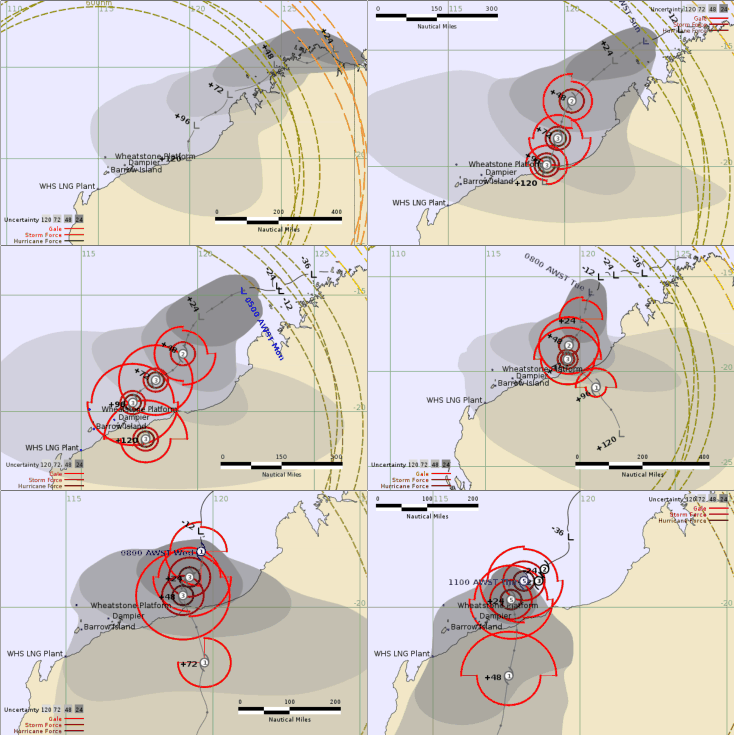
Success!
By leveraging Copilot, I was able to quickly extract the first page from multiple BoM cyclone tracks, create an animated GIF, handle errors, and refine the solution to meet my specific output requirements of a cropped, looping GIF with controlled frame durations – and all of this took no more than 15-20 minutes to produce. Several attendees in the meeting remarked how seeing the changes in cyclone track forecast over the several days Zelia took to make landfall helped them better understand the impact their flexibility in cargo timings could have; a win for both me, and the asset.